The problem
Most cap table questions are small: who owns what after this grant, what does the pool have left, is anything missing before a round. Each one used to mean opening the app and clicking through forms. If you already spend your day in Claude or Codex, the faster way is to ask.
The catch is trust. An AI that adds up shares on its own, or writes to your records without asking, is worse than no AI. So 0.1.5 lets your AI use Capfolder, while Capfolder keeps the math and the final say with you.
1. Ask, see a preview, say yes
Ask in plain words: "Give Steve Wozniak 40,000 options, 4 years with a 1-year cliff, from today." Your AI reads the cap table and the latest 409A from Capfolder, then shows a preview: the exact grant and the cap table after it. Nothing is recorded yet. Say yes and it's written to your folder.
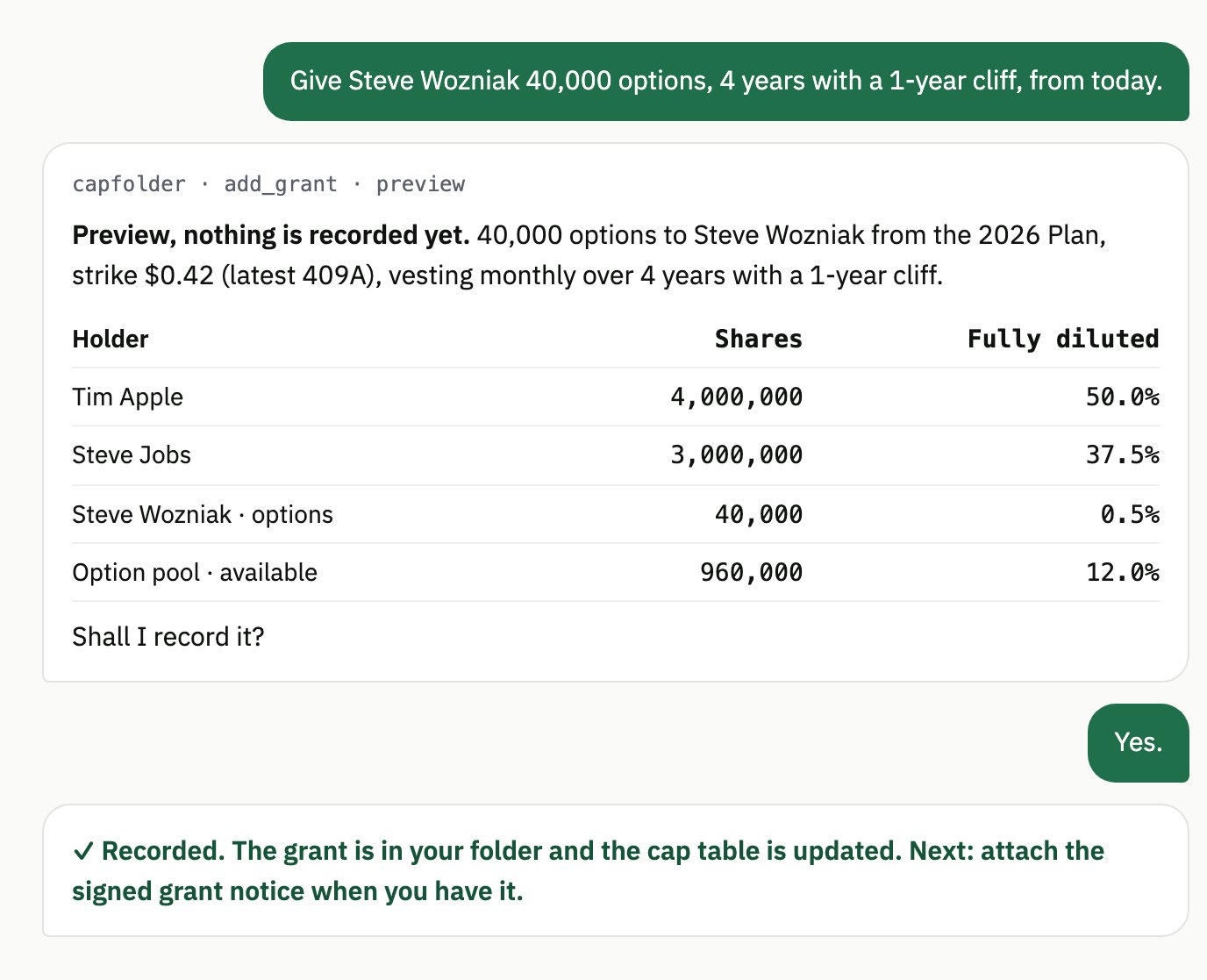
A few rules your AI can't get around:
- Preview, then yes. A change is written only after you confirm the exact preview you were shown. A preview expires after 10 minutes, and it's refused if the folder changed in between.
- Capfolder does the math. Your AI never adds up shares itself. Every number comes from Capfolder.
- Every record is checked. Each one is checked against the Open Cap Table Format before it's written, and every write is logged in
events.jsonl. - Documents are data. Text inside a PDF can't make your AI do anything. If a document contains instructions, your AI tells you instead of following them.
2. Set it up with one command
Needs Node 22 or newer, which Claude Code, Codex and Gemini CLI already use. Run this and it finds the AIs on your computer and sets up each one:
npx capfolder installIn the app, the same setup is in Settings → AI → Connect your AI: pick your AI and copy its command. Claude Desktop installs from a file on the releases page instead.
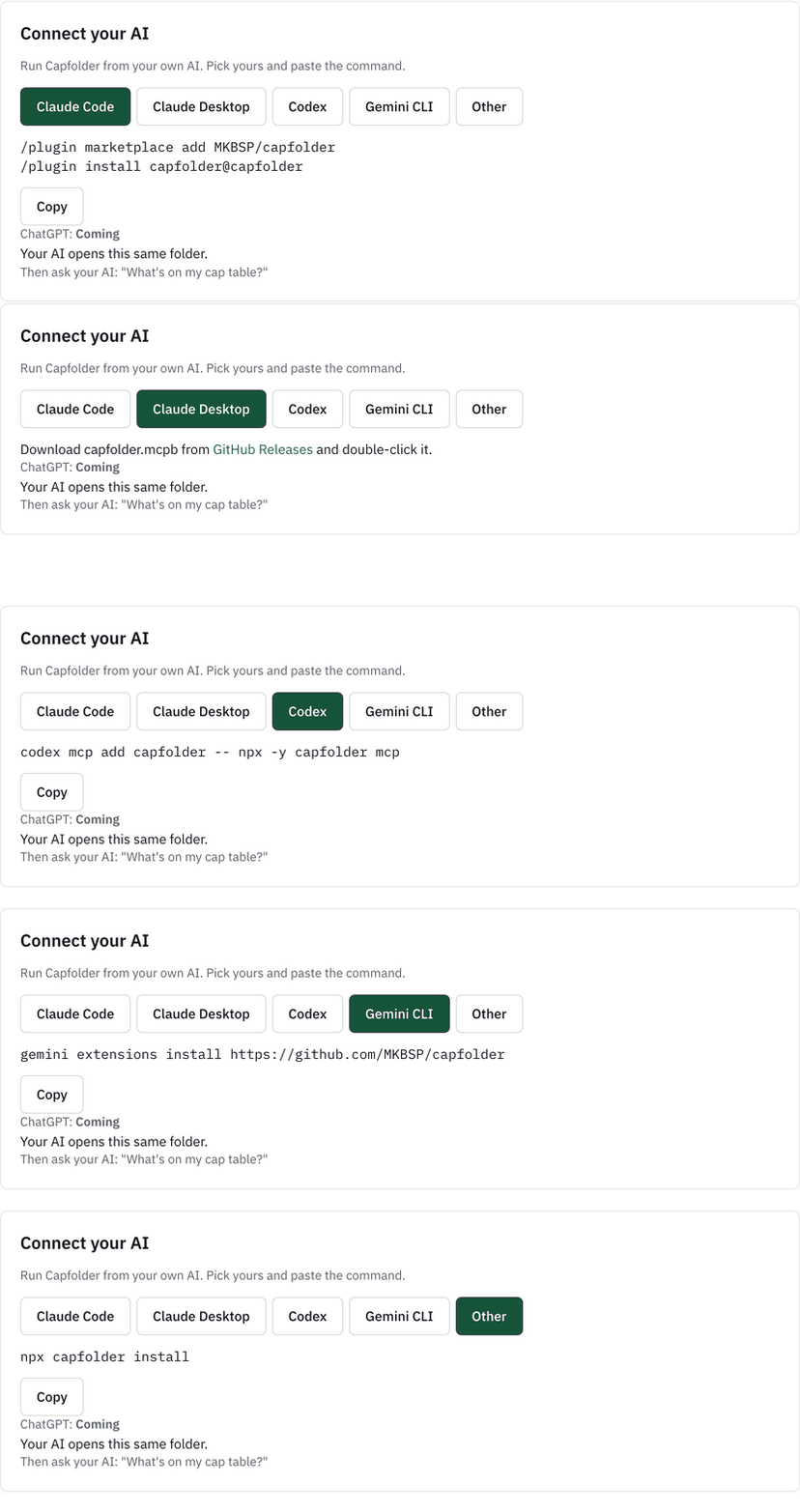
Then ask your AI "What's on my cap table?"
3. Not incorporated yet?
Cofounders often agree on a split long before there's a company. Your AI can now record the shares you promise each founder. When the company is incorporated, one step turns them into real Common shares, after a preview and your yes.
4. The app and your AI share the folder
The desktop app and your AI open the same folder. A lock file in the folder makes one wait while the other saves, so they can't overwrite each other's work.
What it doesn't do yet
- ChatGPT and claude.ai in the browser can't connect yet. That connection is being built.
- Sending and chasing signatures from chat, and investors or employees reading their own holdings from their own AI, are coming next. See the roadmap.
- If you use a cloud AI, what it reads to answer you goes to that AI company. The folder stays on your computer, and with a local model nothing leaves it.
Try it
Capfolder is free and open source (AGPL-3.0), and runs on macOS, Windows and Linux. Your cap table stays in a folder on your own computer, and there's no account to create. New to Capfolder? Here's a first SAFE in the desktop app, from the cap table to signed:
What's the first thing you'd ask your AI about your cap table? Tell us on GitHub.
Screenshots from Capfolder 0.1.5 and capfolder.com/features/ai, with the sample company. Full list of changes: CHANGELOG. Capfolder isn't legal advice.